A little background about this - Each person may have their own way of testing or finding issues. They may not necessarily find my method helpful to understand the basics, this is something i'm trying to generalize for the newcomers in software/ firmware testing. My intention is to make a series out of it, if i can and get enough motivation to write the basic stuffs.
This may not be so interesting topic to read, but sometimes it is needed to know some keywords. I’ll try to express them in simple language (if possible avoiding any definition/ jargon).
Testing can be categories in two major parts:
1.0 Black Box Testing
2.0 White Box Testing
[It can be categories in many ways. Depending on what angle you look into it. The way i’m dividing may not necessarily be the only way. ]
1.0 Black Box Testing - It is nothing related to “Black Box” as the word says, but it’s about testing the software with knowing anything internal and check the output against the Specs. [1]The tester is aware of what the software is supposed to do but is not aware of how it does it.
2.0 White Box Testing - Usually done by the developers. And yes, we are not the only one who test, developers also test their software by writing some test code. Internal knowledge of the software is vastly needed for this kind of testing.
Little bit more description about these two broad categories:
Black Box Testing
| |||
Functional Testing
Graphical User Interface Testing
Internationalization
|
Equivalence Partitioning
Boundary Value
|
End-to-End Testing
User Acceptance Testing (UAT)
|
Smoke
Sanity
System Testing
Regression
|
Functional Testing - Without knowing any internals of the software, you enter input and examine the output according to the Specs. Think about the features of a software. All of those features are functions and thus to test all those feature what we do is the functional testing.
Equivalence Partitioning - is kind of technique that is used in functional testing. I would say more of technique then a type of test. [1]It is a software testing technique that divides the input data of a software unit into partitions of equivalent data from which test cases can be derived. [4] In equivalence partitioning technique we need to test only one condition from each partition. This is because we are assuming that all the conditions in one partition will be treated in the same way by the software. Similarly, if one of the conditions in a partition does not work, then we assume that none of the conditions in that partition will work so again there is little point in testing any more in that partition.
We all have seen the School grading system. Just want to give one specific example. School grading system says if marks between 80-89 then A- marks >= 90 then ‘A+’ and so on. Obviously there are many more grades, just want to discuss this.
- Checking the Range- Marks falls into different conditions/ ranges. If we check one condition, other should also be same. If we check for the conditions that says about ranges then we do not have to test other ranges.
- We need to check the Lower and Greater condition as well. Anything below 60, anything above 90 condition needs to be checked.
- Also, we assumed that marks will be positive. What if the marks is negative (someone pissed off the teacher). Invalid partition test needed.
If we want have more understanding, follow the reference [4] for another example.
Boundary Value - is another kind of technique that is used in functional testing. It is related to the Equivalence Partition testing. It it testing at the boundaries between partitions. We need to check the boundaries of the input. Here we have both valid boundaries (in the valid partitions) and invalid boundaries (in the invalid partitions). Most of the software has input fields. Let’s say it takes some numeric value for Age. First we have to find out the min and max allowed value for such input. Then we can try three conditions - within the min max range, above the max, below the min value.
Data Validation - It is a technique that ensures the integrity of the data. Data validation is intended to provide certain well-defined guarantees for fitness, accuracy, and consistency for any of various kinds of user input into an application or automated system. When i get the first build, in order to occupy them with some feedback/ issues, first thing I try is to check whether it can handle different kinds of input. Above mentioned two techniques are part of this test.

Data Validation - It is a technique that ensures the integrity of the data. Data validation is intended to provide certain well-defined guarantees for fitness, accuracy, and consistency for any of various kinds of user input into an application or automated system. When i get the first build, in order to occupy them with some feedback/ issues, first thing I try is to check whether it can handle different kinds of input. Above mentioned two techniques are part of this test.

Graphical User Interface Testing - It is about testing the User Interface as per the given sample design. Sometimes customer wants something in specific order/ place. This will make sure that everything was placed as it should be. It is easy to go crazy about testing the Graphical User Interface because you can put argument from many angle. Just make sure you don’t carried away with this type of testing. I recommend to be flexible about the minor/ trivial GUI issues. One thing to mention, always to a spell check on labels. It’s a part of this test, if not, I included them now.
Internationalization Testing - Software may needed to support different international settings. For example, software needs to be compatible with the operating system’s setting so that with a given input with different language/ region/ format it does not blow up. A software that intent to work with German language and region should have the mechanism to handle the commas instead of dot to represent a German floating point number. Germany usages 1.211,2 which is equivalent to 1,211.2 in English. This test could also be termed as Globalization, localization test.
End-to-end Testing - [2]End to end testing is performed by testing team, focus of end to end testing is to test end to end flows e.g. right from order creation till reporting or order creation till item return etc and checking. End to end testing is usually focused mimicking real life scenarios and usage. End to end testing involves testing information flow across applications
User Acceptance Testing - This would be the last part of testing phases. At the end of all the testing, software is given to user/ client to look at it, whether it meets user expected features or not. This is usually a checklist type of test. User sign of the UAT document before releasing / taking the software. This is to check whether it meets their business requirement.
Smoke Testing - Smoking! This about checking the stability of the build given by the developer whether it’s good enough to test or not. Usually you can pick one or few major functions randomly and check whether it worth to test the rest of the build functionalities. If any of the major functionalities fail then it's a Show Stopper and build is rejected to test. It’s like cooking rice, pick a few and get the sense whether rest of the rice is eatable or not.
Sanity Testing - [3]Sanity testing is a quick evaluation of the software, environment, network, external systems are up & running, software environment as a whole is stable enough to proceed with extensive testing. Sanity tests are narrow and most of the time sanity tests are not documented. [5] After receiving a software build, with minor changes in code, or functionality, Sanity testing is performed to ascertain that the bugs have been fixed and no further issues are introduced due to these changes
System Testing - [2] this includes multiple software testing types that will enable to validate the software as a whole (software, hardware and network) against the requirements for which it was built. Different types of tests (GUI testing, Functional testing, Regression testing, Smoke testing, load testing, stress testing, security testing, stress testing, ad-hoc testing etc.,) are carried out to complete system testing.
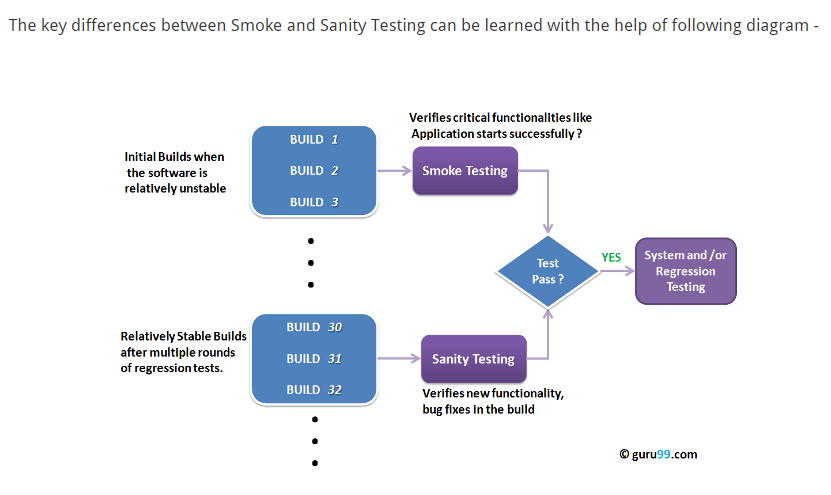
Picture Courtesy: Guru99.com
Regression Testing - Do it again and again and again. Regression testing is about doing the testing on the full system again and again. When we start testing and find issues, developers fixes some issues. At that time we just don’t sit idle. We keep going testing other component or features. Once we get the fix we verify those particular fix and then we re-run the whole test on the software. This will ensure that for a particular fix, nothing is broken unexpectedly. This is the hard part for a human being. For the Manual tester, this is the nightmare. That is why, more and more automated testing is getting popular only for this area.
White Box Testing
| |||
Unit Testing
Component Testing
|
Unit Testing - I always gets different option when I put this test under the White Box testing. It’s not about whether it belong to white box or not, it is about who is going to perform it. With all respect, developers are the one who should be able to use this kind of testing more effectively than any others. Developers will write test fixture/ suits to test the internal part of the program. They can test a single function or they can test a series of function or class mimicking the inputs using the code. Some tools are : dB unit testing, HTTPunit testing, Junit Testing, NUnit testing. This is not the traditional “automation testing” but it indeed an automation testing by the developer.
Component Testing - [2]This type of software testing is performed by developers. Component testing is carried out after completing unit testing. Component testing involves testing a group of units as code together as a whole rather than testing individual functions, methods.
Other types of Testing
| |||||
Integration Testing
Security Testing
|
Load Testing
Performance Testing
User based scenario testing |
Recovery Testing
Conversion Testing
Safety testing
|
Alpha Testing
Beta Testing
| ||
Integration Testing - [4]Once the individual units or components are tested by developers as working then testing team will run tests that will test the connectivity among these units/component or multiple units/components. There are different approaches for Integration testing namely, Top-down integration testing, Bottom-up integration testing and a combination of these two known as Sand witch testing.
Security Testing - This is the most challenging testing. No matter what we do, they (the BOSS people) finds a way to sneak in. Security consist of many things from Network, Hardware, Database, software etc all component has their own protection mechanism. For software, i would generalize it as check for the common exploit options - like SQL injection, URL encryption for POST, inputs, use of public variables instead of private etc. [2]Security testing basically checks, how good is software’s authorization mechanism, how strong is authentication, how software maintains confidentiality of the data, how does the software maintain integrity of the data.
Load Testing - How much load it can take is the load testing. [4]Load testing is a type of non-functional testing; load testing is done to check the behavior of the software under normal and over peak load conditions. Load testing is usually performed using automated testing tools. Load testing intends to find bottlenecks or issues that prevent software from performing as intended at its peak workloads.
Performance Testing - [2]is a type of software testing and part of performance engineering that is performed to check some of the quality attributes of software like Stability, reliability, availability. Performance testing is carried out by performance engineering team. Unlike Functional testing, Performance testing is done to check non-functional requirements. Performance testing checks how well software works in anticipated and peak workloads. There are different variations or sub types of performance like load testing, stress testing, volume testing, soak testing and configuration testing.
User Based Scenario Testing - Sometimes people call them 1% scenario or Negative scenario testing. I personally think, this is a pretty important testing where we usually miss to understand the user’s possible behavior. I have studied many sites and most of them seems to give important to this type of testing. To learn about more, please read my first posting of my blog, which i’m pretty confidant that you will think about it twice once you read the blog.
Recovery Testing - [1] In software testing, recovery testing is the activity of testing how well an application is able to recover from crashes, hardware failures and other similar problems. Recovery testing is the forced failure of the software in a variety of ways to verify that recovery is properly performed.
Conversion Testing - Conversion testing is to verify that one data format can be converted into another data format so that the converted data format can be used seamlessly by the application under test appropriately.
Recovery Testing - [1] In software testing, recovery testing is the activity of testing how well an application is able to recover from crashes, hardware failures and other similar problems. Recovery testing is the forced failure of the software in a variety of ways to verify that recovery is properly performed.
Conversion Testing - Conversion testing is to verify that one data format can be converted into another data format so that the converted data format can be used seamlessly by the application under test appropriately.
Safety Testing - Safety first. Software are not always like software. It could drive a device/ machine/ car/ etc. When it gets into such level, and when it interacts with the people, we need to make sure that software does not raise any issue that can harm people. For example, if you are testing a treadmill which has the software control over the speed, we need to make sure no matter what scenarios it may occur, the stop button will always stop the mill gradually. Abrupt stop may actually cause accident, so it should slow down gradually.
Alpha Testing - Alpha testing is basically by a fresh pair of eye testing. After testing is done, to check by a fresh unbiased pair of eye, it is sent to internal users to test.
Beta Testing - Done by the end users. Possible sites are chosen to try the beta version of the software before releasing it to production. Once the feedback is given by the customer and they find it ok, then the UAT is signed off and software is ready to release.
References:
[1] Wikipedia


